
1. Why This Camera?
I came across this cheap IPC camera on a local marketplace here in South Africa. The price was perfect to mess around with the device and potentially break it. The device cost around R300, or roughly $10.
My goal with this device was to go from zero to one hundred in terms of how I document findings, while also looking at every nook and cranny I could reasonably reach.
From my initial research into these no-name, internet-connected devices, they tend to compromise on both security and privacy.
From the outset, I want to make a few things clear. Within this post you will not find a tutorial on “how to hack”, nor will anything be blown out of proportion. This post is meant to be a reverse engineering and analysis exercise.
2. Initial Recon, Out of the Box Behaviour
To understand normal operating behaviour, the device needs to be used exactly as intended. This includes:
- Reading the manual it came with
- Plugging it in and getting a feel for boot times
- Watching for any boot messages
- Using the mobile app and understanding its dependency
- Noting early red flags such as cloud-only usage or lack of a local UI
With that methodology in mind, we start at the top.
The manual was fairly well written, with no obvious grammar or spelling issues. The app required for viewing and control is called Tris Home. It appears to be a generic IPC viewer backed by cloud infrastructure.
When powered on, the camera announces “device booting” via the onboard speaker. The app then pops up saying a nearby camera has been discovered. After adoption, another message plays: “device added to Wi-Fi”.
Initially there were no major red flags, but a few things stood out:
- Account creation immediately triggers cloud storage upsells
- The app appears to be the only supported interface
- The app feels generic, capable of onboarding many brands
3. Network Analysis, Watching It Talk
This is where things get interesting.
We set up a small lab using a spare Raspberry Pi and a simple script to create a MITM access point. The camera connects to the internet as normal, but all traffic passes through us.
Setting up a controlled network
The script configures hostapd and dnsmasq.
hostapd puts the Wi-Fi adapter into AP mode, creating a hotspot with an SSID and password of our choosing. dnsmasq handles DHCP and IP assignment.
This gives us a clean interface to monitor with tools like Wireshark, in this case wlan0.
For anyone being extra cautious, the Pi can be placed inside a dedicated VLAN, isolated from the rest of the network.
Tools used in the controlled network
-
tcpdump
CLI packet capture for raw traffic inspection. -
mitmproxy
Active interception and inspection of higher-level traffic. -
Custom tooling
Simple scripts to spoof or sinkhole unchecked HTTP services.
Observations
Before analysing anything meaningful, we verify the basics:
- The access point is working
- Devices receive IP addresses
- The camera has outbound connectivity
- Camera functionality remains intact
Once confirmed, the workflow is simple:
- Start the access point
- Start tcpdump
- Start mitmproxy
- Power on the camera
mitmproxy immediately surfaced interesting behaviour:

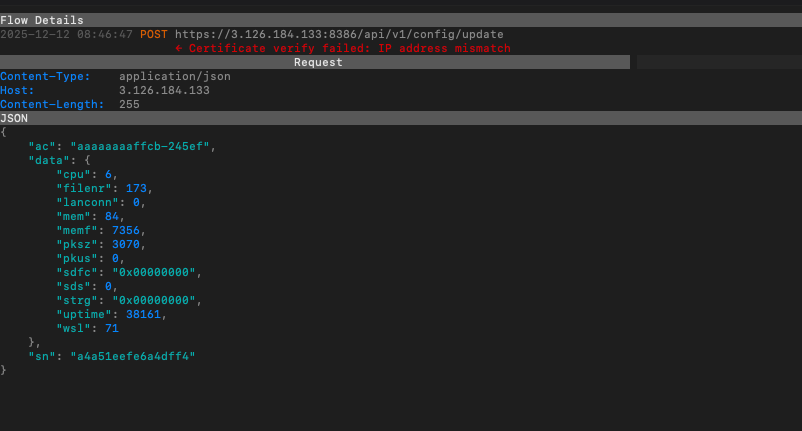

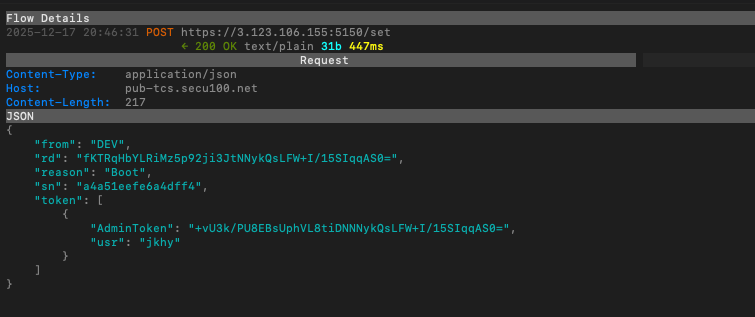
On boot, the camera contacts multiple external hosts and establishes persistent connections very early in the startup process.
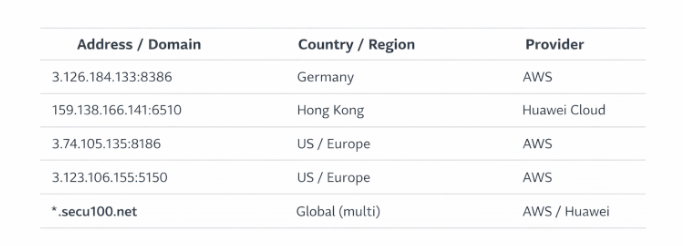
Interesting Protocols Observed on the IPC Camera
During analysis, a few security related protocols stood out. None of these were theoretical. All were observed through traffic capture, MITM.
1. Proprietary TCP Control Channel (Port 34567)
This port appeared consistently.
- Proprietary binary protocol on TCP port 34567
- Used for registration, keep-alives, and remote control
- Common in low-cost Chinese IPC devices
- Historically associated with weak or static authentication
This effectively functions as the main control plane.
2. Plain HTTP (No TLS)
Although the device generated HTTP traffic, it did not expose a traditional local web interface.
Observed behaviour included:
- Backend-style HTTP requests
- Configuration and firmware-related endpoints
- Cloud communication over plaintext HTTP
Important clarifications:
- No browser-accessible admin interface
- No local login or management panel
- Endpoints were machine-to-machine, not user-facing
Key observations:
- No HTTPS by default
- No certificate validation or pinning
- Highly verbose during boot
This made the device susceptible to MITM.
3. Cloud Update and Configuration Endpoints
The device attempted to reach multiple cloud endpoints:
- Hardcoded IP addresses and domains
- Cloud-hosted infrastructure, including large public providers
- Domains such as
*.secu100.net
Some endpoints were referenced directly by IP, indicating a weak update trust model.
4. Persistent Cloud Tunnel Behaviour
Rather than a single protocol, this was a consistent pattern:
- Device boots
- Immediately phones home
- Registers with cloud services
- Maintains long-lived TCP sessions
This enables NAT traversal but creates strong cloud dependency and reduced local-only usability.
Collectively, the device relies on:
- Proprietary TCP control traffic
- Unencrypted HTTP for updates and configuration
- Persistent outbound connections
- Cloud-first architecture with weak trust boundaries
4. Physical Teardown, Opening the Camera
I usually open devices to see what makes them tick. This camera is reasonably well built for mass production, but it does not resist a standard Phillips screwdriver.
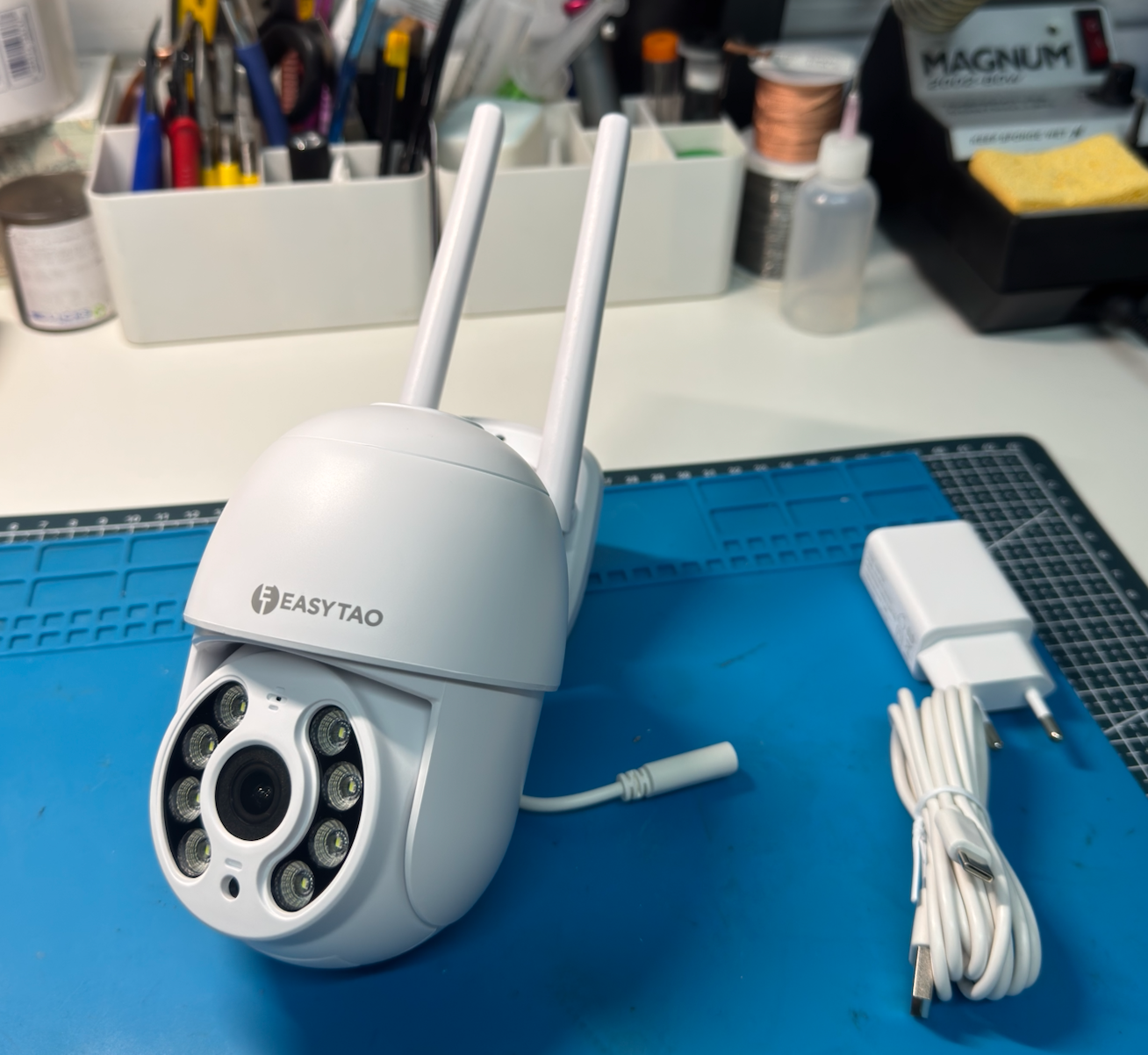
This is not a full iFixit teardown, just a high-level inspection.

Notable components include:
- Main board
- LED and IR module
- Motors
- Enclosure components
- Antennas
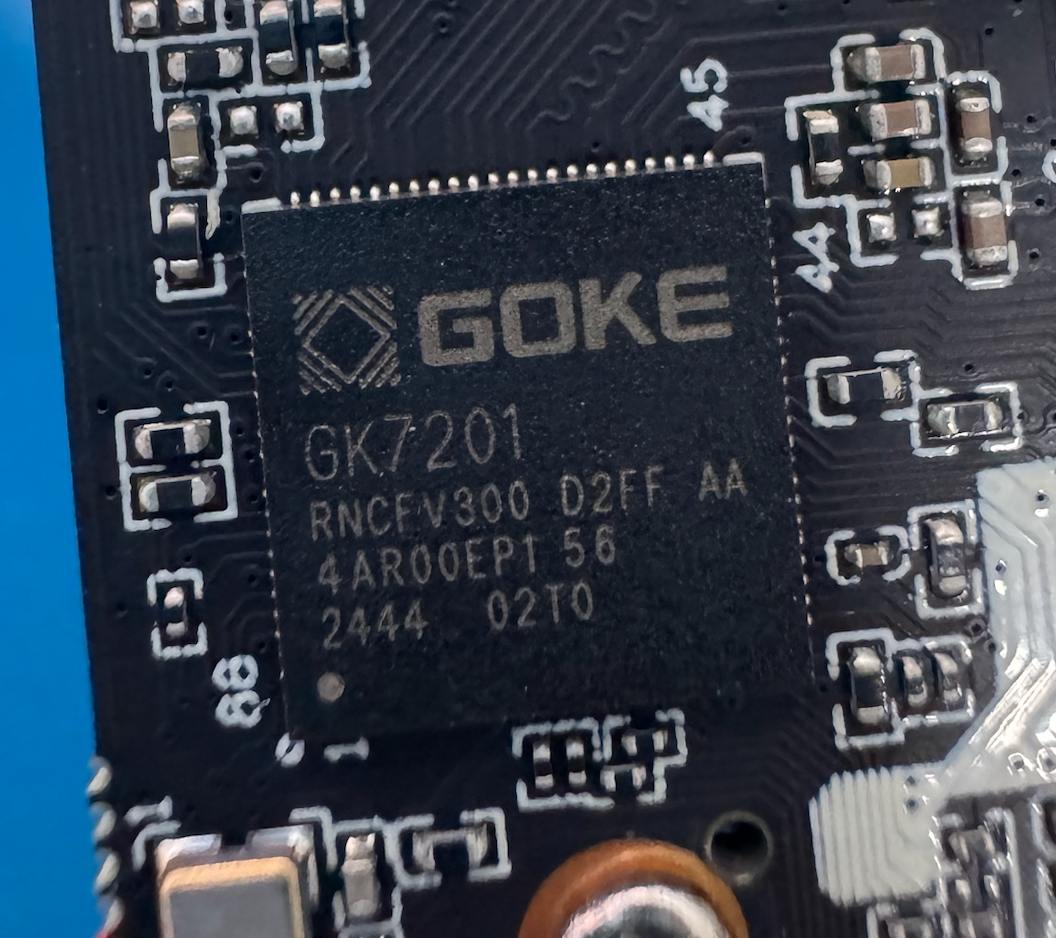
A closer look at the PCB shows a Goke GK7210 SoC, a common vision processing chip used in low-cost cameras.
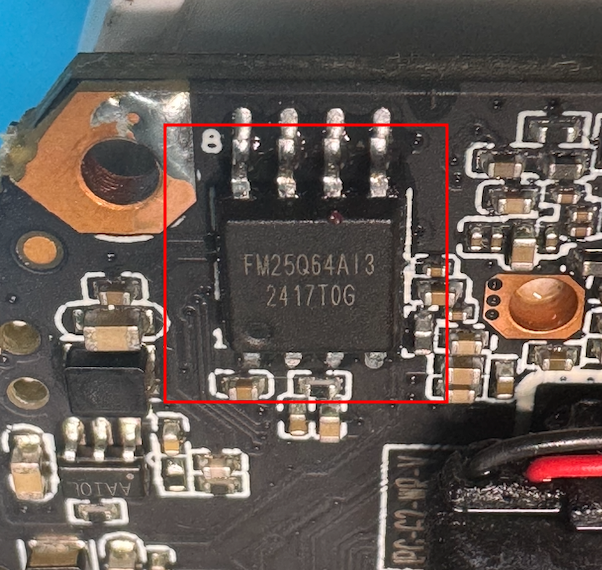
The flash ROM chip acts as the device’s primary storage.
 The Wi-Fi module is external to the SoC. Interestingly, only one antenna cable was actually connected. The second was present but unused, likely for marketing reasons.

5. Debug Interfaces, UART
Test pads were present on the board, outlined below.
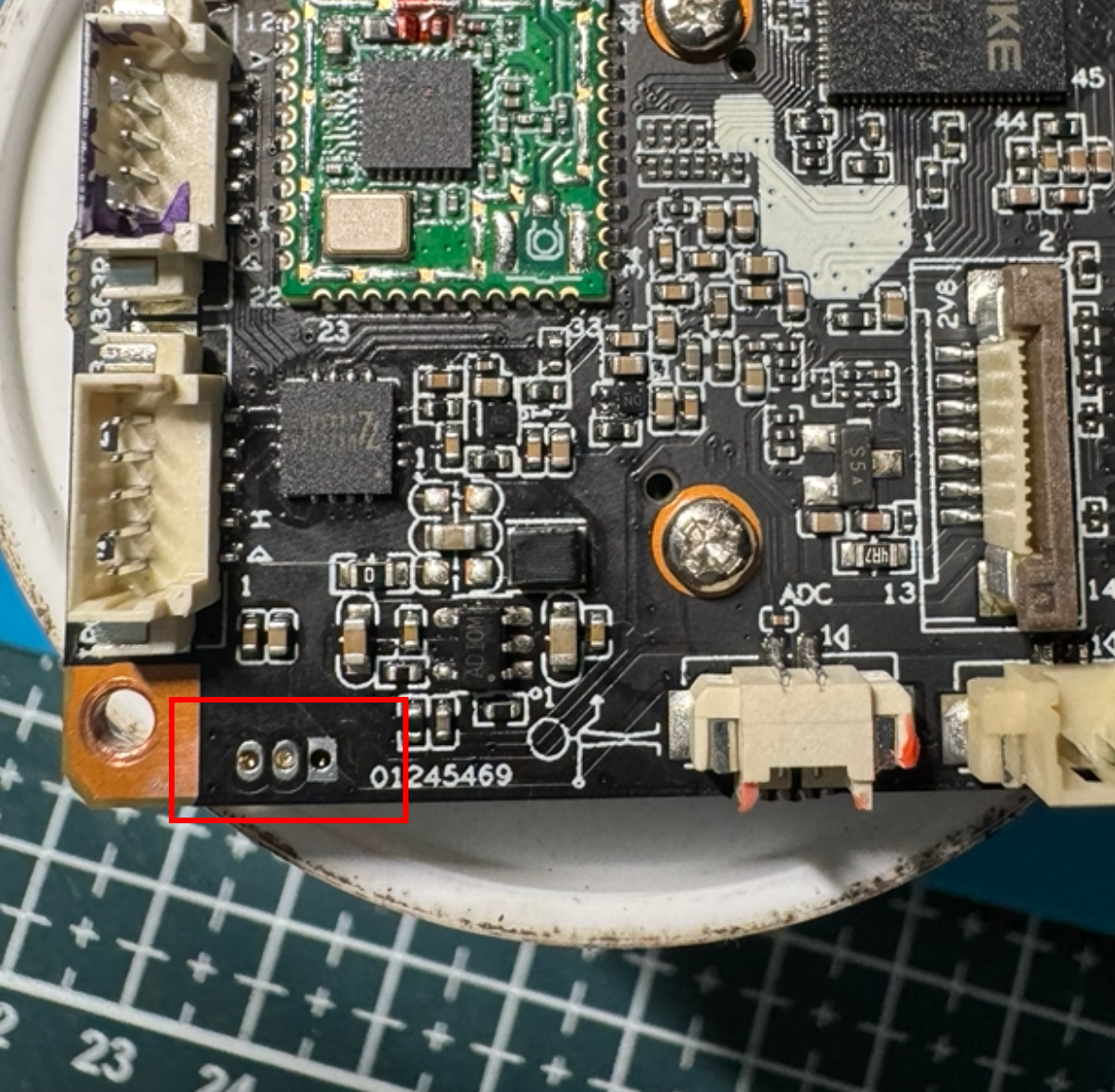
These UART pads are commonly used during development and manufacturing and almost always remain on final products.
UART output was enabled and provided full boot logs, but all inbound input was ignored.
This strongly suggests a vendor-modified U-Boot configuration where interactive access is intentionally disabled, rather than a wiring or baud-rate issue.
6. Firmware Extraction and Analysis
With UART offering limited access, firmware extraction was required.
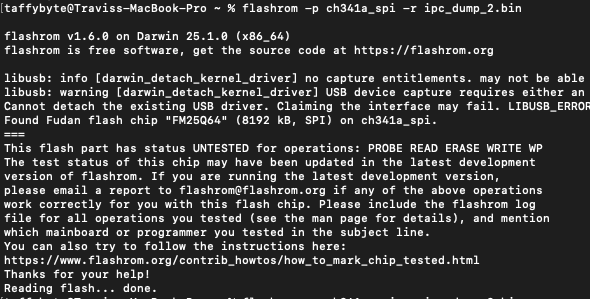
The flash chip was removed and dumped using a flash programmer. Multiple dumps were taken and hashed to ensure consistency, with a golden copy preserved.
Using binwalk, partitions and offsets were identified.

One notable finding was the presence of a root password hash in /etc/passwd, which cracked quickly using a common wordlist.
7. Cloud Dependency and Update Mechanism
The firmware and observed network behaviour make it clear that this device is heavily cloud-dependent.
On boot, the camera attempts to contact multiple vendor-controlled endpoints for registration, configuration, and update checks. Several of these endpoints are hardcoded into the primary application binary, rather than being dynamically resolved or user-configurable.
Firmware updates appear to follow a module-based OTA model. The device requests a list of available modules, then selectively downloads update payloads from cloud infrastructure. While this approach allows incremental updates, it also centralises trust entirely in external services.
There is no user-visible indication of signature verification, update provenance, or rollback capability. From an owner’s perspective, updates are opaque and automatic.
This raises several long-term concerns:
- If update servers go offline, functionality may degrade
- If domains expire or infrastructure is shut down, updates fail silently
- If the vendor disappears, cloud-dependent features may stop working entirely
Local-only usage appears limited. While RTSP streaming is present, configuration, management, and updates are clearly designed around continuous cloud connectivity.
This is less about immediate exploitation and more about lifecycle and supply-chain risk.
8. Security Observations (Not Sensational)
Objectively Weak Areas
- Unauthenticated network services exposed during normal operation
- Plaintext HTTP traffic for configuration and update-related requests
- Firmware built without obvious hardening, with debug strings present
Bad Design vs Exploitable Issues
Poor design choices include implicit trust in the local network, cloud-first assumptions, and opaque update mechanisms.
Potentially exploitable surfaces exist, but no active exploitation was attempted or demonstrated.
Attack Surface Summary
- Network: multiple open TCP ports, proprietary protocols, persistent outbound connections
- Physical: exposed UART pads with output enabled
- Firmware: monolithic image with cloud endpoint references
What Was Not Tested
No exploit development, fuzzing, credential attacks, firmware modification, or cloud impersonation was performed.
All observations were made through passive analysis, controlled network interception, and non-invasive hardware inspection.
9. Practical Takeaways
For home users, network isolation, firewalling, and local-only usage where possible significantly reduce exposure.
For researchers, cheap IoT devices remain excellent learning platforms, exposing real-world constraints and design trade-offs.
For vendors, basic improvements around authentication, TLS usage, and transparency would meaningfully raise the security baseline.
10. Closing, Why This Matters
Cheap IP cameras are not edge cases. They are everywhere, deployed on private networks and rarely revisited after installation.
Most users will never inspect firmware, observe network behaviour, or question update mechanisms. That gap between deployment and understanding is where hardware security still matters.
This research did not uncover a dramatic exploit, and that is the point. Security issues are often rooted in assumptions, not elite attackers.
Hardware hacking remains one of the few disciplines that cuts across firmware, silicon, network, and reality.
What’s Next
This analysis focused on observability rather than exploitation.
Follow-up work will look at:
- RTSP behaviour and access control
- Custom protocol reverse engineering
- Firmware update mechanics in more detail
- Cloud dependency and failure modes
That will form the basis of Part 2.
Not to sensationalise, but to understand.